 by
by In today’s digital age, computers have become an inseparable part of our daily lives. Whether it’s education, business, healthcare, or entertainment, computers play a vital role in shaping how we work, learn, and communicate. From powerful desktops to portable laptops and even smartphones, computer technology continues to evolve and influence every aspect of modern living.
However, like any technology, computers come with both Understanding both sides helps us use them wisely and avoid potential drawbacks. In this blog, we’ll explore the key pros and cons of computers, Advantages and Disadvantages of Computers supported by a detailed comparison table and real-life.
What Is a Computer?
A computer is an electronic device that processes data and performs calculations automatically according to a set of instructions called programs. It can perform multiple functions such as typing documents, browsing the internet, playing games, and analyzing large datasets.
Computers have become essential tools in nearly every industry—from schools and offices to hospitals and factories.
Advantages of Computers
Computers have transformed human life in countless ways. Below are some of the most important benefits of using computers in everyday life and work:
Table of Contents
1. Speed and Efficiency
One of the biggest advantages of computers is their speed. Tasks that would take humans hours or even days can be completed by computers in seconds. For example, processing payroll, running simulations, or editing videos can be done quickly and efficiently with the right software.
2. High Accuracy
Computers are extremely accurate when performing calculations and following commands. They eliminate many of the human errors that occur in manual data entry or processing. This reliability is why computers are heavily used in banking, research, and engineering.
3. Large Storage Capacity
Modern computers can store enormous amounts of information—from simple documents and photos to large databases. This eliminates the need for bulky files or paper storage systems, making data organization and retrieval much easier.
4. Better Communication
Computers allow instant communication through emails, video conferencing, and messaging apps. Businesses rely on this for international collaboration, while individuals use it to stay connected with friends and family across the globe.
5. Automation and Productivity
Computers automate repetitive tasks such as billing, data analysis, or report generation. This not only saves time but also boosts productivity and allows people to focus on creative or strategic work.
6. Access to Information and Education
The internet, powered by computers, is the biggest source of knowledge in human history. Students can take online classes, access digital libraries, and learn new skills anytime, anywhere. E-learning has become a major benefit of computer technology.
7. Entertainment and Creativity
From watching movies to creating digital art and composing music, computers offer endless entertainment and creative possibilities. Gaming, video editing, and social media are all computer-based activities that enrich modern life.
Disadvantages of Computers
While computers bring numerous benefits, they also have some negative impacts when overused or misused. Here are the main disadvantages:
1. Health Issues
Spending long hours in front of a computer can cause eye strain, neck pain, and repetitive strain injuries. Poor posture and lack of physical activity are also major health concerns linked to computer use.
2. Cybersecurity Threats
With the rise of the internet, data breaches, hacking, and online scams have become common. Without proper cybersecurity measures, personal and financial data can be stolen or misused.
3. Unemployment
Automation and computerization have replaced many traditional jobs. For example, robots and software now handle tasks that once required human labor, leading to job losses in certain industries.
4. Addiction and Distraction
Many people spend excessive time on computers—especially for gaming, social media, or streaming—leading to addiction and reduced productivity. It can also negatively affect mental health and social interactions.
5. High Cost of Maintenance
Although computers have become more affordable, high-end systems and software can still be expensive. Additionally, maintenance, repairs, and regular upgrades add to the overall cost.
6. Privacy Concerns
When users share information online or use cloud services, their data may be at risk of being accessed by unauthorized parties. Privacy protection has become a major global issue in the digital age.
7. Overdependence on Technology
Many people rely too heavily on computers for even basic tasks. This dependence can reduce critical thinking and problem-solving skills, making individuals less capable when technology fails.
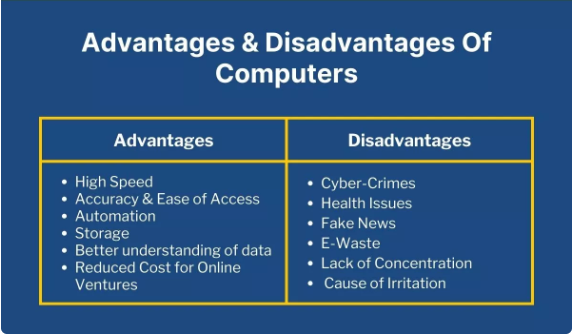
Comparison Table: Advantages and Disadvantages of Computers
| Advantages | Disadvantages |
|---|---|
| High speed and efficiency | Health issues due to long usage |
| Accuracy and reliability | Cybersecurity threats |
| Large data storage | Job losses due to automation |
| Improves communication | Addiction and distraction |
| Automates repetitive tasks | Expensive maintenance and upgrades |
| Easy access to knowledge and education | Privacy concerns |
| Source of entertainment and creativity | Overdependence on technology |
How to Use Computers Wisely
To get the most out of computers while minimizing their drawbacks, it’s important to use them responsibly. Here are a few tips:
- Take breaks: Follow the 20-20-20 rule—every 20 minutes, look at something 20 feet away for 20 seconds to rest your eyes.
- Stay secure: Use antivirus software and strong passwords to protect your data.
- Limit screen time: Balance computer use with outdoor or offline activities.
- Back up data regularly: Keep copies of important files to avoid data loss.
- Upgrade wisely: Invest in updates only when necessary to avoid unnecessary costs.
Conclusion
Computers are one of the greatest inventions of modern times, transforming how we live, learn, and work. Their advantages—such as speed, accuracy, communication, and access to information—are undeniable. However, their disadvantages—including health risks, cyber threats, and dependence—must not be ignored.
The key lies in balanced usage. By understanding both sides of computer technology and using it wisely, we can enjoy its benefits while minimizing its negative effects. In the end, computers should serve as tools to enhance human potential, not replace it.
FAQs
What are the main advantages of using computers?
Computers help us work faster and finish tasks with less effort. They store large amounts of information in one place. They also make communication easier through email, chat, and video calls. Overall, they save time and improve productivity in almost every field.
What are the major disadvantages of computers?
Computers can cause eye strain, back pain, and long sitting habits if used too much. They may also lead to distractions like games or social media. Another issue is that computers can get viruses or face security risks. Plus, they can be expensive to buy and maintain.
How do computers affect students?
Computers help students research quickly and understand topics better through videos and examples. They make assignments easier and help improve digital skills. But overuse can reduce focus and lead to less physical activity. Students need to balance study time with healthy habits.
Are computers always reliable for work?
Computers are powerful tools, but they can fail due to software errors or hardware issues. A small problem can sometimes stop important work. That’s why regular updates and backups are helpful. With proper care, computers can stay reliable for a long time.
How can we reduce the disadvantages of computers?
Taking short breaks during use can protect your eyes and body. Using antivirus software helps keep your data safe. Limiting time on unproductive websites can also increase focus. With a bit of discipline, the disadvantages become much easier to manage.
